DISCOVER WITH AI
How to Use AI Smart Search
Start with the kind of content you want to see. EasyKOL helps you turn that description into search requirements, so you can review a more focused list of creators.
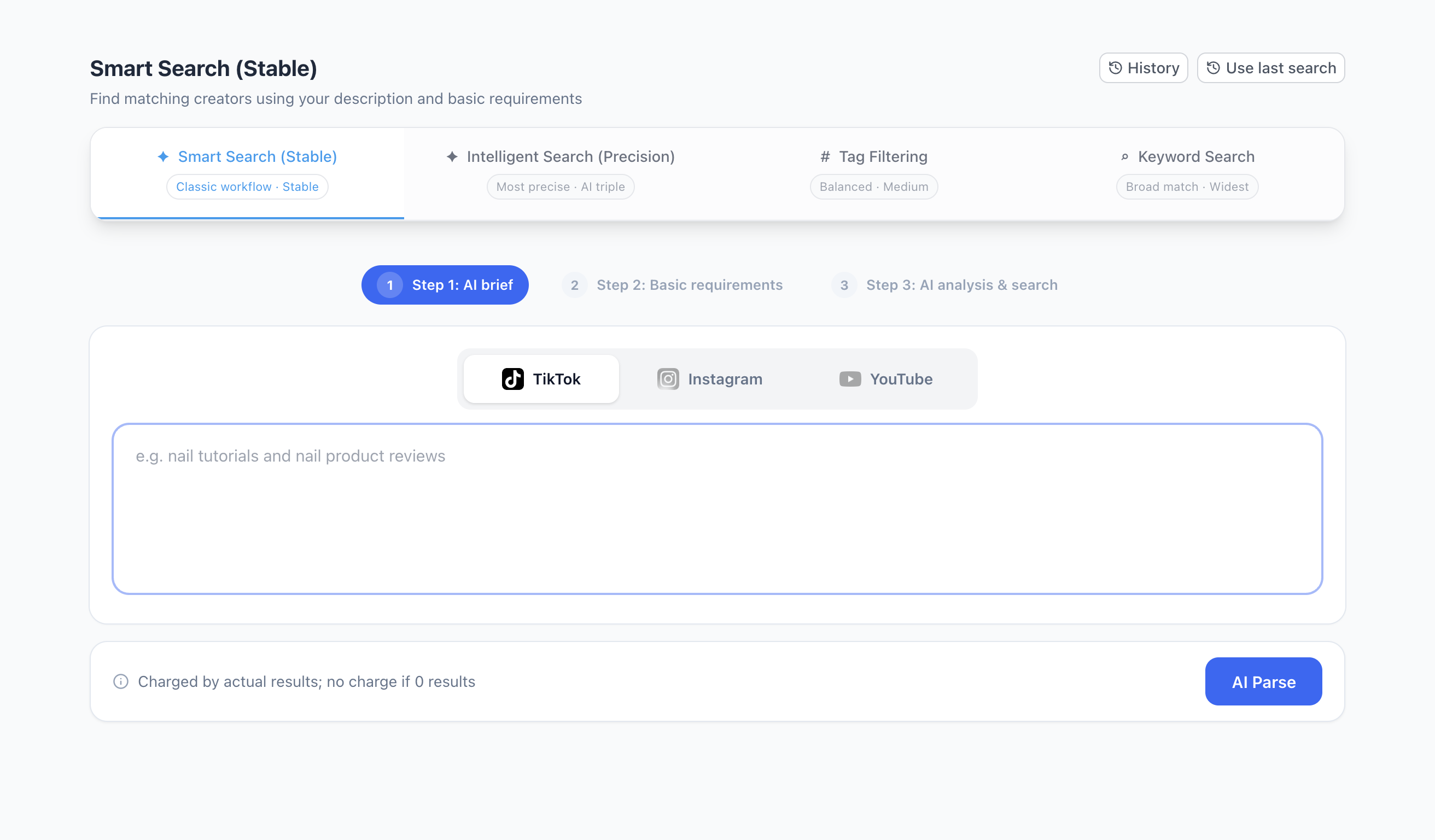
Write a useful brief
Describe the subject and what creators actually do. For example: “Creators who make nail tutorials and review nail products.” Add the market, platform or other requirements that matter to your campaign.
Avoid relying on a single broad term such as “beauty.” A specific content example gives you a clearer starting point.
Run your search
In EasyKOL, open Discover → AI Smart Search.
Choose your search option and platform. Smart Search (Stable) is a guided place to start.
Enter your brief and click AI Parse. Review the proposed requirements and complete the basic settings shown on screen.
Check the search settings and any displayed charges before submitting. Review the resulting profiles and recent content before saving or contacting anyone.
Choose a search option
The screen also offers Intelligent Search (Precision), Tag Filtering and Keyword Search. The right option depends on how specific your brief is and how broadly you want to explore. Availability, timing and costs depend on the settings shown in your account.
Compare the four search options →
Want help finding more relevant creators?
Tell us about your campaign and share a few examples of creators you like. We’ll help you explore an EasyKOL trial.
Chat with us on WhatsApp